
Every asset, one record.
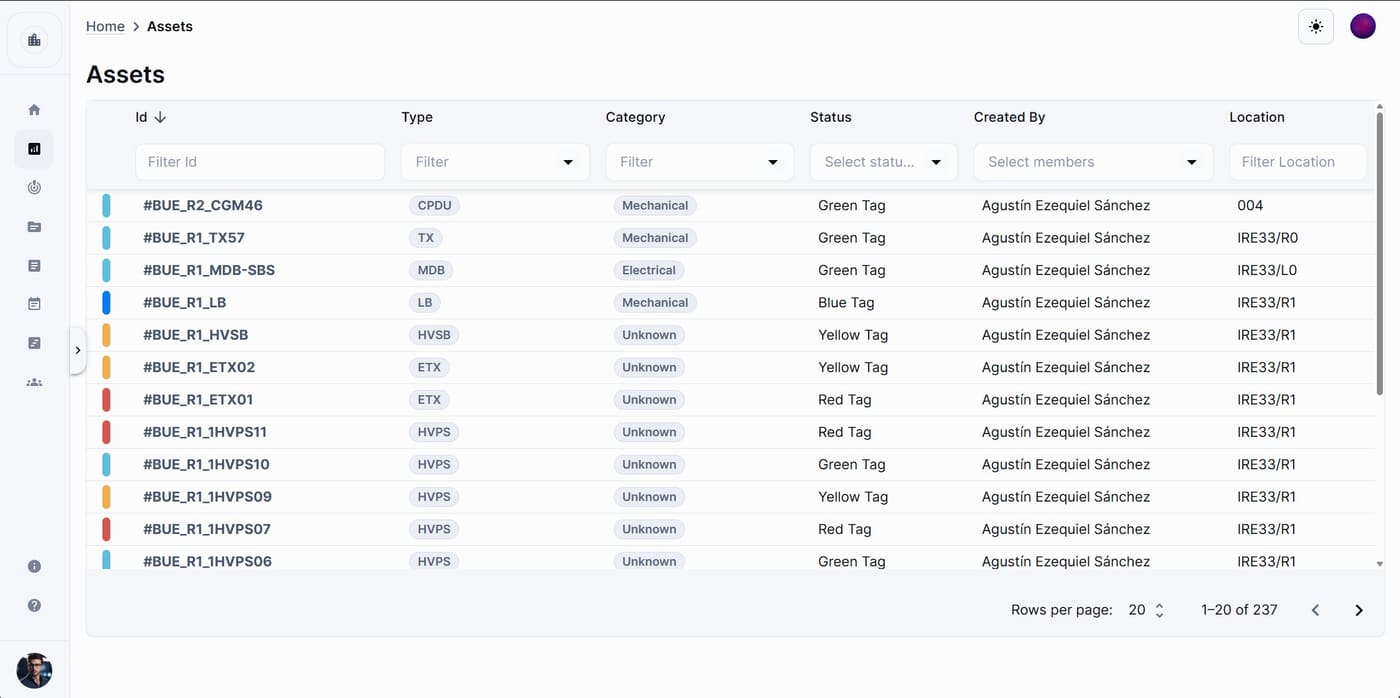
An asset is any equipment, system or item you track on the project: a UPS, an inverter, a switchboard, a rack. Each one has a record with its status, technical data, documents, scripts, issues, planner activities and full history, and everything else in the project links back to it.
Available on
app.cx-assistant.com
What you can do
Import the whole register from a spreadsheet
Drop the equipment schedule into the import wizard, map the columns once and the assets are created with their tags, types, categories, locations and technical fields. The assistant can do the same from an Excel file attached to a chat.
Status with a history
Each asset has a status that follows the transitions your project defines. Every change is kept in the asset's timeline with who did it and when, and the table shows the status at a glance.
Hierarchies and locations
Put a converter inside a turbine or a breaker inside a switchboard with parent and sub-assets, and filter the table by any branch of the tree. Locations have their own tree, from site to room.
Documents, scripts and issues in the same place
The asset dialog shows the documents expected for that asset and which ones are still missing, the test scripts run on it, the open issues raised against it and the planner activities it belongs to.
Technical data from a photo
On the phone, take a picture of the nameplate and ask the assistant to read it. Voltage, serial number and power land in the technical fields of that asset.
Export to Excel
The filtered list exports to a spreadsheet with the columns you see, so the register leaves the project in the format the client asks for.
How a team uses it
- 1
The project admin imports the equipment schedule and sets the asset statuses the project will use.
- 2
Engineers on site open each asset from the phone, update its status, attach photos and raise issues against it.
- 3
Document controllers track which documents each asset still needs from the asset's documentation tab.
- 4
Target milestones set a commissioning level for a set of assets, so the planner shows what should be reached by when.
- 5
At handover, the register and the history export to Excel for the client file.
In more detail
What is on an asset record
Details, technical fields, status dates, attachments, documentation, scripts, planner, sub-assets, map position and history, each in its own tab. Custom attributes let the project add the technical fields its equipment needs.
Who can change what
Creating, editing, importing and deleting assets are separate permissions. Project admins and members can create and edit by default; the creator of an asset can always edit it.
The assistant knows your assets
Mention an asset with # in any chat. Ask which issues are open on it, what documents it is missing, or ask the assistant to update a field, and it does it on that record.
Locations with their own page
Sites, buildings, floors and rooms form a tree the project manages on the Locations page. Each asset sits in one location, and the asset table and the map filter by it.
The full guide, step by step
The same help the app shows, published here: every screen, every field, every permission.
Questions
Yes. The import wizard takes a spreadsheet, lets you map its columns to asset fields and creates the assets in bulk. Technical fields and locations are matched on the way in.
Yes. Set a parent on an asset and it becomes a sub-asset; the tree can go as many levels deep as your equipment needs, and the table filters by any branch.
Every status change, field edit and attachment is recorded in the asset's history timeline with the person and the time, and the timeline can be filtered by type of change.
Ready to see your next project clearly?
Bring assets, issues, documents, and schedule into one place — and put an AI assistant that knows your project next to every engineer.
No credit card required · Web, mobile & Office