
Which documents exist, and which are missing.
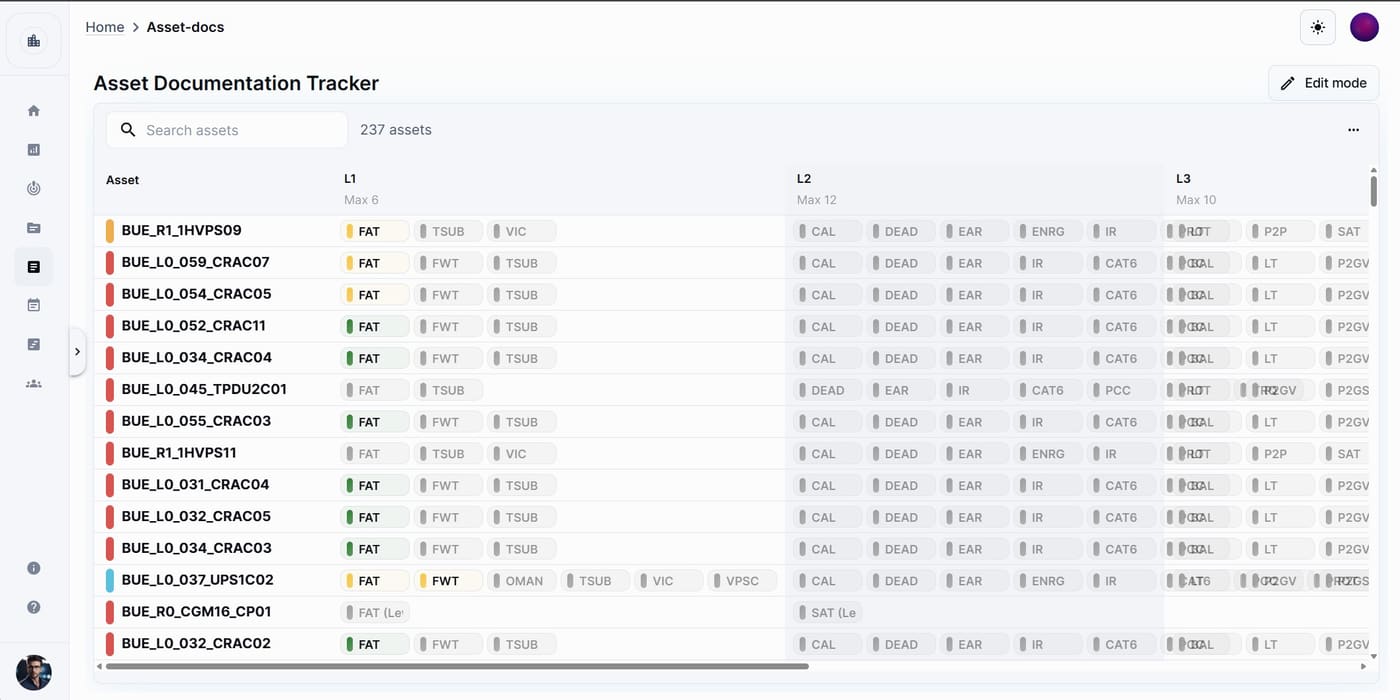
A tracker is a status grid: rows of items crossed with document placeholders, where each cell shows the state of a linked document. The built-in Asset Docs tracker crosses your assets with their document requirements, and you can build others for any set of deliverables. Trackers update live as teammates link documents or change statuses.
Available on
app.cx-assistant.com
What you can do
Assets crossed with their documents
The Asset Docs tracker answers which documents each asset has and in what state. Drag items from a palette of the project's documents, a catalogue of standard commissioning documents and your script templates onto the asset rows, column by column.
Link a document to a cell
Open a cell and link a document, folder or script from the project; the chip reflects it. Open jumps to the document in Documentation, and Relink or Unlink change it later.
Review mode or Status mode
In Review mode each cell mirrors the review outcome of its document, approved, rejected or in review, and the cell action is Send for review. In Status mode you set the status yourself from a list you manage, each with a name, a colour and a meaning: Done, Open or Blocked.
Filter, search and count
Above the grid there is a row search, a status filter, a group filter and status count chips; click a count to filter by that status. Script cells also show their completion percentage.
Watch a tracker
Click the bell to watch a tracker. You are notified when a tracked document is rejected in a review, and when a row becomes fully complete with every cell linked and done.
Export to PDF or Excel
Export the grid with your current filters, with cell notes, project logos and grayscale as options. The file opens for download and is also saved as a document. An export holds up to 5000 rows.
How a team uses it
- 1
The project admin opens Asset Docs and drags the required documents onto the asset rows, group by group.
- 2
Engineers link each uploaded test report or certificate to its cell, with a note such as waiting on vendor where needed.
- 3
In Review mode, cells go to review from the tracker and change as the reviews are decided.
- 4
The team filters by status to see what is still missing, and the count chips give the totals.
- 5
Before handover, the tracker exports to PDF or Excel with the current filters applied.
In more detail
Build your own trackers
Create a tracker from a template or blank, add rows one label per line (up to 1000 at a time), add groups and placeholders with a short code, and drag placeholders onto rows. Switching between view and edit mode never loses data.
The library at a glance
Each tracker card shows a live mini preview of its grid and a status bar summarising its cells. Archive the trackers you no longer need and show them again with a switch.
Notes on a cell
Keep a note on any cell, such as resubmitted 3rd version. A cell with a note shows a small icon, the note appears on hover, and notes can be included in the export.
Who can change what
Everyone with a built-in role can view, export and watch trackers. Project admins and members create trackers, link documents and set statuses by default; archiving and deleting is for project admins.
The full guide, step by step
The same help the app shows, published here: every screen, every field, every permission.
Questions
That is what it is for: rows of items crossed with document placeholders, each cell showing the state of the linked document, updated live for the whole team and exportable to Excel or PDF.
In Review mode cell statuses mirror each linked document's review outcome and are not set by hand. In Status mode you set each cell from your own status list. You can switch without losing data.
Yes. Documents, folders and scripts can be linked, and dropping a script template onto Asset Docs creates a script for each asset in that group. Script cells show their completion percentage.
Ready to see your next project clearly?
Bring assets, issues, documents, and schedule into one place — and put an AI assistant that knows your project next to every engineer.
No credit card required · Web, mobile & Office